Connect ZenMode to Grok Bot (MCP): find, research and prepare LinkedIn outreach
Use the ZenMode connector in Grok Bot to find people showing buying intent, draft their messages and build a paused campaign, with a yes before any credit is spent.
Verified against the product on 6 November 2026 · Updated · Set up in /dashboard/api
What this integration is
Grok Bot is xAI's agent in Grok: you hand it a task and it works through it, step by step, and can carry on while you do something else. It uses the same connectors as Grok chat, so once ZenMode is connected on grok.com, Grok Bot can use ZenMode's tools too.
Server address: https://www.zen-mode.io/api/mcp
With ZenMode connected, one request to Grok Bot can find people showing buying intent with Signals, draft each person's connection note and follow-ups, put them in a paused campaign and run the launch check. For the whole flow as a step-by-step guide, see Run a LinkedIn sales team from Grok Bot.
Grok and Grok Bot are made by xAI. ZenMode works with them through its MCP server and is not affiliated with xAI.
The safety rule
Your assistant can write messages, build a campaign and start it once you say yes. ZenMode then sends them within your daily limits and business hours, while the desktop app is open. Nothing is sent at the moment the assistant asks: people are contacted only through one of your campaigns, at your pacing.
Two things always wait for your yes, whatever you ask Grok Bot to do:
- Spending credits. Finding people with Signals costs credits. ZenMode first gives Grok Bot a quote: the cost, the credits you have left and a code that works once. Grok Bot has to show you that and wait. Without your yes, it cannot spend.
- Starting a campaign. A campaign made from Grok Bot is always created paused. Starting it needs a summary shown to you and your yes, the same way.
Before you start
- You need a ZenMode plan of Practitioner or above (a free trial counts as the plan you are trialling). Signals is included on those plans.
- A Grok plan that includes Grok Bot. We used Premium; xAI decides which plans include it and can change that.
- Create an API key under MCP / API in the dashboard. Tick Let AI assistants make changes if you want Grok Bot to find people and build campaigns. A key left unticked keeps every connection read only.
- The ZenMode desktop app installed, for when you decide to start a campaign.
Add ZenMode to Grok Bot
These are the steps we ran on 6 November 2026 on grok.com, on the web. Grok's menus change, so treat the names as a guide.
-
In Grok, open Plugins at the bottom of the sidebar. On the Connectors tab, click New Connector, then Custom. If ZenMode is already listed under Connected from Grok chat, skip to step 4.
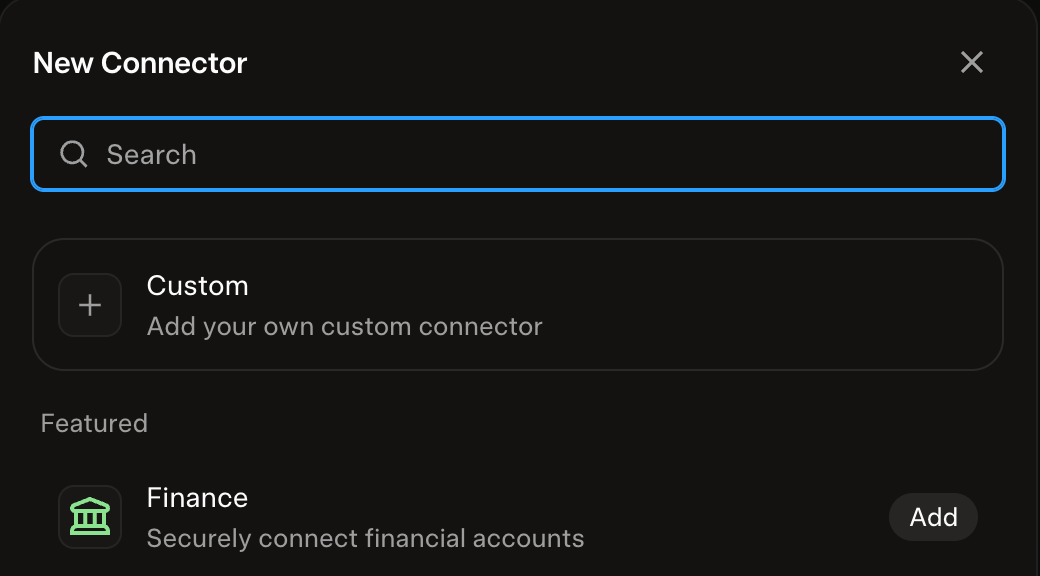 Grok: Plugins, New Connector, Custom. Screenshot, 6 November 2026.
-
Name it ZenMode, enter
https://www.zen-mode.io/api/mcpas the Server URL, and click Add Connector. -
A ZenMode page opens. Sign in to the ZenMode account you want Grok Bot to use, choose Read and change, choose your API key, and click Allow. To change access later, open the connector in Grok and click Reauthenticate.
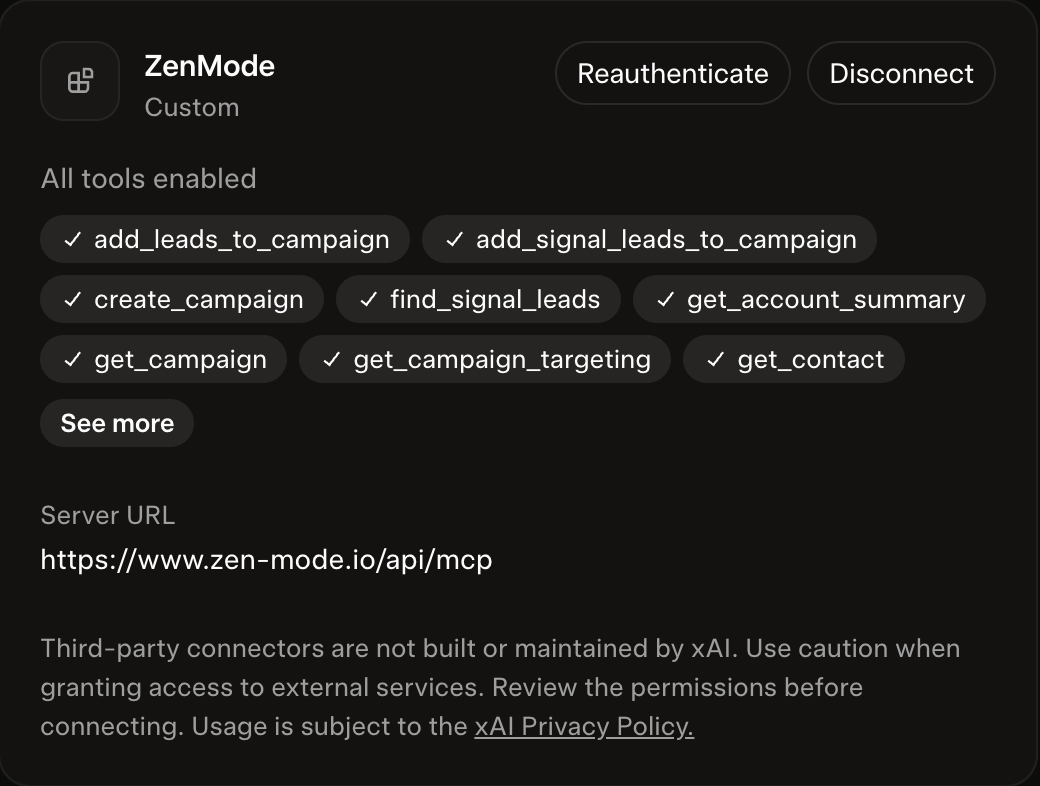 Grok: the ZenMode connector, with Reauthenticate to change access. Screenshot, 6 November 2026.
-
Open Grok Bot in the sidebar (under Bots). Ask it a read-only question first, for example: "Call get_signal_credits and list_campaigns, tell me the credits left and the newest campaign, and change nothing." If the answer does not match your dashboard, Grok is connected to a different ZenMode account: reauthenticate and sign in to the right one.
What we tested, and what we did not
On 6 November 2026 we ran the steps above in Grok Bot against the live server, on our own ZenMode account with a connection that allows changes, and stopped before any campaign started:
-
Grok Bot answered the read-only check with the same credits and newest campaign as our dashboard.
-
We asked it to find up to 10 new people showing buying intent, research them and prepare outreach. It quoted up to 10 credits, showed the credits left and when the quote expired, and waited. After our yes it found 10 people, and our credits went down by exactly 10.
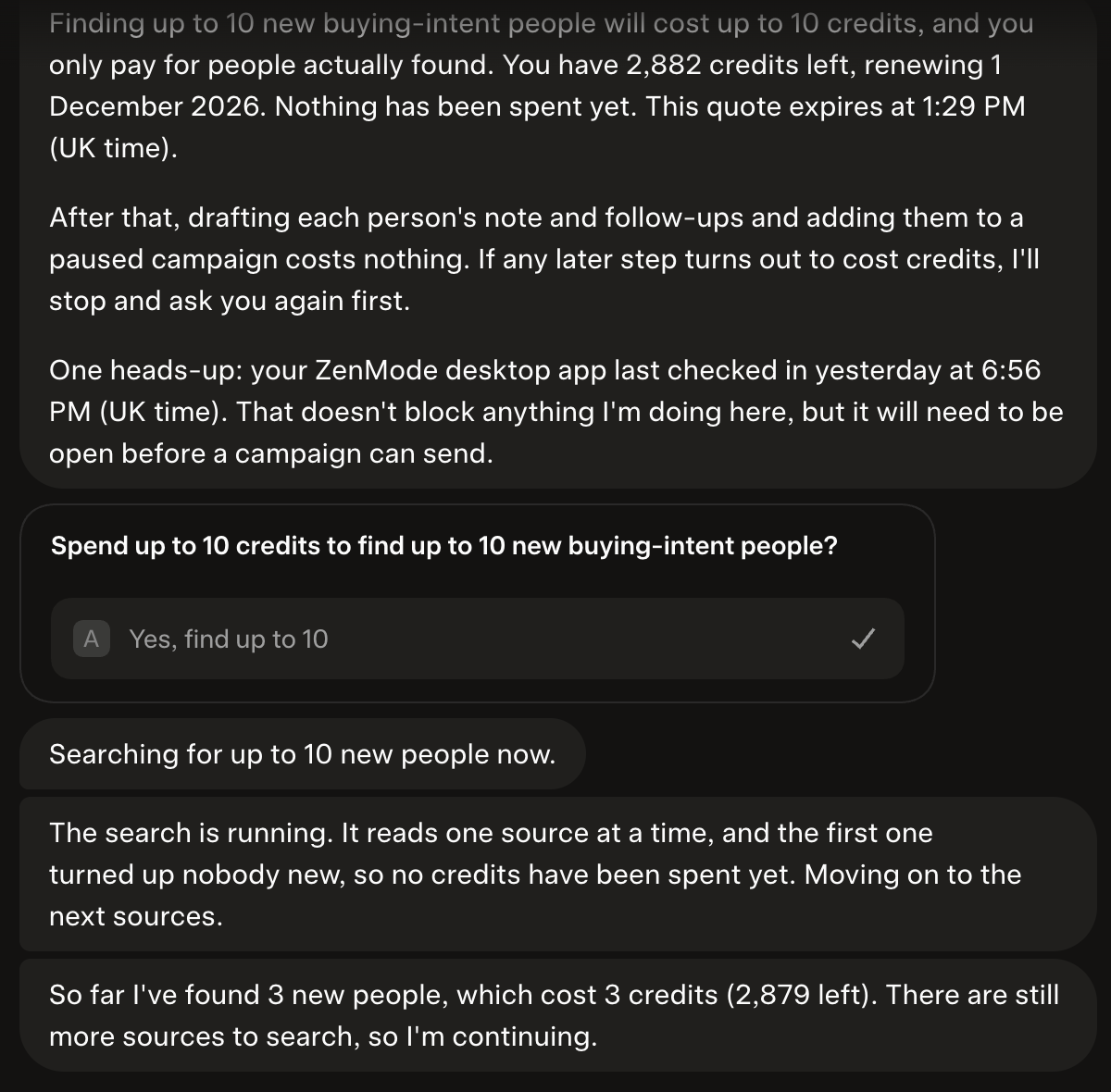 Grok Bot asks before spending, then searches. Screenshot, 6 November 2026.
-
It drafted each person's note and follow-ups (free), created a campaign, paused, with all 10 people in it, and ran the launch check without starting the campaign. The check reported that our desktop app needed an update, so ZenMode gave Grok Bot no launch code. We checked all of this in the dashboard, not only in Grok Bot's answer.
The same morning, in Grok chat, the first connection we found was read only: every change was refused with
read_only_credential until we reauthenticated with Read and change.
We did not test starting a campaign from Grok Bot, Grok's mobile apps, Grok inside X, or xAI's API.
Example prompts
- "Using ZenMode: find new people showing buying intent, research them and prepare outreach. Find no more than 10 people. Before anything that spends credits, show me the cost and wait for my yes. Build the campaign paused, run the launch check only and stop there. End with a summary of what's ready."
- "Show me the launch check for my newest ZenMode campaign. Do not start it until I say yes."
- "Read the latest replies in my ZenMode campaigns and tell me who I should answer first today."
- "Pause my newest ZenMode campaign."
Limits
Each API key can make 60 tool calls a minute. A connection that allows changes is capped at 10 changes a minute and 300 a day, and at most 500 people a day can be added through an assistant. Each search Grok Bot runs is held to the credits you agreed to. Your LinkedIn daily and weekly limits are separate and are applied by your campaigns, as always.
FAQ
Is Grok Bot a different connector from Grok?
No. Grok chat and Grok Bot share the connectors you add on grok.com. Connect ZenMode once and both can use it, with the access you chose on the ZenMode page.
Can Grok Bot spend my credits on its own?
No. Every credit spend needs a quote shown to you and your yes, and the search can never spend more than the figure you agreed. Drafting notes and follow-ups for people it found costs nothing.
Will Grok Bot write my messages instead of my campaign's sequence?
For the people it researches, yes: ZenMode drafts each person's own note and follow-ups, and those replace the campaign's messages for that person. When ZenMode has no good reason for a personal note, the person gets a connection request with no note. Every message is in the campaign's contact list for you to read before you start it.
Can Grok Bot send LinkedIn messages or connection requests?
Your assistant can write messages, build a campaign and start it once you say yes. ZenMode then sends them within your daily limits and business hours, while the desktop app is open. Nothing is sent at the moment the assistant asks, and Grok Bot cannot start a campaign without your yes.
How do I disconnect Grok Bot?
Open Plugins in Grok, click the ZenMode connector and choose Disconnect, or revoke the API key you chose in the ZenMode dashboard. Either ends the connection for Grok chat and Grok Bot straight away.