Free · 12 steps · 3 stages

Founder Growth Playbook

Build the engine once. Book calls every week.

Twelve steps in three stages: Inbound, Outbound and Scale. Each one says what it is, why it matters, what to do this week, which tools to use and gives you a template to copy.

We'll email you this PDF either way. Ticking the box is optional. How we use your email: privacy policy.

Free. We'll email you the PDF. Questions: hello@zen-mode.io.

Read the 12 steps
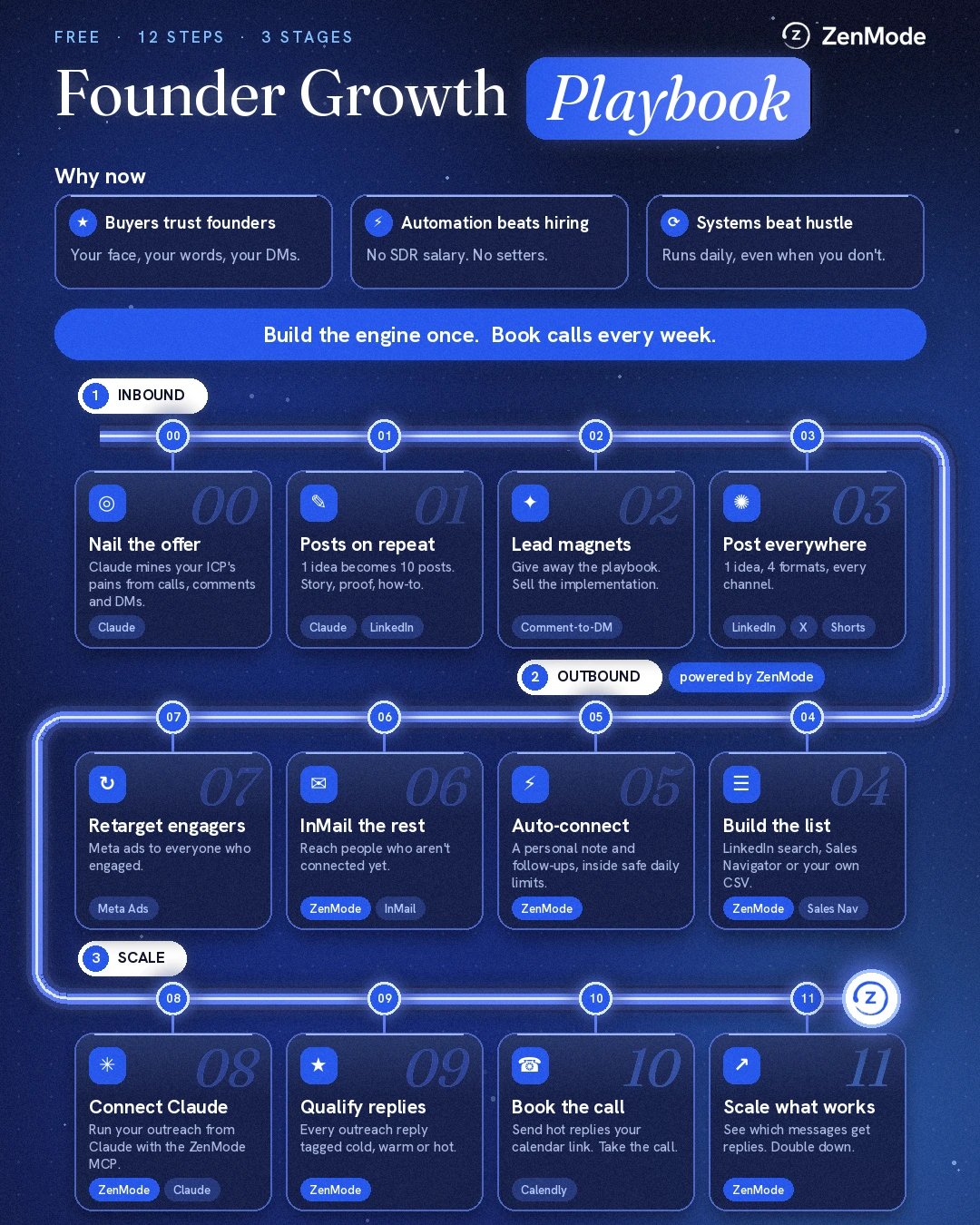
The Founder Growth Playbook as one flow: Why now, then Inbound steps 00 to 03, Outbound steps 04 to 07 and Scale steps 08 to 11.

Why now

  • Buyers trust founders

    A founder's name, face and words carry weight a brand account does not. People reply to the person who built the thing, so put yours on the posts and the messages.

  • Automation beats hiring

    A system does the repetitive work daily for the cost of a subscription, with no SDR salary and no setters to manage. You keep the conversations that need a founder.

  • Systems beat hustle

    Hustle stops when you stop. A system runs daily, including the weeks you are building product or on a call. Build it once, then maintain it.

The 12 steps

InboundSteps 00 to 03

Work out what you are selling, then make people come to you. It also gives every cold message something to point at.

Step 00: Nail the offer

Claude mines your ICP's pains from calls, comments and DMs.

What it is

One sentence that says who you help, what they get and what happens next. Every post, lead magnet and message in the playbook repeats it.

Why it matters

A vague offer makes every later step vague. Customers already describe their problem in their own words, so you can use theirs instead of guessing.

Do this week

  1. Collect the last 20 to 50 pieces of customer language you have: call transcripts, comments, DMs and emails from people who match your ideal customer.
  2. Paste them into Claude with the prompt below and ask for the pains grouped by theme, in the customers' own words, with how many times each comes up.
  3. Pick the one pain you can solve fastest and prove most easily.
  4. Write the offer as one sentence using the template.
  5. Say it out loud to three real prospects. Rewrite any part where they ask what you mean.

Tools

  • Claude
  • Call transcripts or notes
  • A shared doc
Template: Prompt for Claude
Below are messages and call notes from people who match my ideal customer. List the problems they describe, grouped by theme. Quote their exact words. Show how many times each theme comes up. Do not invent anything that is not in the text.

[paste the material]
Template: The offer sentence
I help [who] get [outcome] without [the thing they hate]. If that is you, [one next step].

Example: I help agency owners book sales calls from LinkedIn without hiring an SDR. If that is you, the playbook is below.

Step 01: Posts on repeat

1 idea becomes 10 posts. Story, proof, how-to.

What it is

A repeatable posting routine built on one idea at a time, written in three shapes: a story, a proof point and a how-to.

Why it matters

People look at your profile before they accept a request or answer a message. Posts are what they find when they do.

Do this week

  1. Take the offer from step 00 as the one idea for the next two weeks.
  2. Ask Claude for 10 angles on it: 3 stories, 3 proof points and 4 how-tos.
  3. Write the ones you can back with something that really happened first. Do not post proof you do not have.
  4. Schedule one post a day for two weeks using LinkedIn's own scheduler.
  5. Note which posts get questions in the comments and write the next batch around those.

Tools

  • Claude
  • LinkedIn
Template: Three hook formulas
Story: [Customer type] told me [exact quote]. I had been getting it wrong.
Example: A founder told me, "I post every day and nobody books a call." I had been giving the same advice for a year.

Proof: [Real result, with their permission]. Here is what we changed.

How-to: How to [outcome] in [number] steps, without [objection]:

Step 02: Lead magnets

Give away the playbook. Sell the implementation.

What it is

A free asset that solves one small piece of the problem. People get it by commenting a keyword or leaving an email address.

Why it matters

It turns a passive reader into someone who raised their hand, and it shows your thinking before you ask for a call.

Do this week

  1. Choose a format you can finish in a week: a checklist, a template pack or a short PDF.
  2. Outline it using the template below, with your step 00 offer as the promise.
  3. Draft it with Claude, then rewrite it in your own voice and add one real example per section.
  4. Post it with a one-word comment trigger and send the link to each person who comments.
  5. Keep a list of everyone who asked for it. They are your warmest prospects.

Tools

  • Claude
  • LinkedIn
  • A comment-to-DM tool (optional)
  • A PDF or doc tool
Template: Lead-magnet outline
Title: the result, not the format.
1. Who this is for, in one line.
2. The problem, in the customer's words.
3. Five to seven steps, each with one example.
4. One template they can copy.
5. Next step: book a call, or try the product.
Template: The post
I wrote down how we [outcome] as a [short format].

It covers [three things inside].

Comment [WORD] and I will send it to you.

Step 03: Post everywhere

1 idea, 4 formats, every channel.

What it is

One idea published in four formats across LinkedIn, X and YouTube Shorts instead of one post on one channel.

Why it matters

Different people spend time in different places. The work of having the idea is already done, so the extra formats cost little.

Do this week

  1. Take your best-performing post from step 01.
  2. Turn it into a LinkedIn text post, a LinkedIn carousel, an X thread and a 30 to 60 second Short script.
  3. Batch it: write all four in one sitting.
  4. Schedule them across the week rather than the same day.
  5. Put the lead magnet link in your profile and in the first comment of each post.

Tools

  • LinkedIn
  • X
  • YouTube Shorts
  • Claude
Template: Repurpose map
LinkedIn post: the idea in 8 to 12 short lines.
LinkedIn carousel: one slide per step, the hook on slide one.
X thread: the hook, then one step per post.
Short: say the hook in the first two seconds, make one point, end with one call to action.

OutboundSteps 04 to 07

Go to the people who match your offer instead of waiting. This is the stage ZenMode helps with, apart from retargeting.

Step 04: Build the list

LinkedIn search, Sales Navigator or your own CSV.

Powered by ZenMode

What it is

A list of the specific people who match your offer, taken from a LinkedIn search, a Sales Navigator search or a CSV you already have.

Why it matters

Outbound is only as good as who is on the list. A small list of the right people beats a large list of nearly right people.

Do this week

  1. Write your ideal customer in one line: job title, company size, industry and country.
  2. Build the LinkedIn or Sales Navigator search for it and read the first 20 results by eye.
  3. Fix the filters until at least most of those 20 are people you would be glad to sell to.
  4. Remove competitors, existing customers and anyone who has asked you to stop.
  5. Start with a few hundred people, not thousands. Add a note on why each one is relevant if you can.

Tools

  • ZenMode
  • LinkedIn search
  • Sales Navigator
  • Your own CSV
Template: Ideal customer line and first-20 check
Titles: Founder, CEO, Managing Director
Company size: 2 to 10 employees
Industry: [your industry]
Country: United Kingdom

First-20 check: would I be happy if all 20 of these said yes? If fewer than most, change the filters before you send anything.

Step 05: Auto-connect

A personal note and follow-ups, inside daily limits.

Powered by ZenMode

What it is

Connection requests with a short personal note, then a follow-up sequence for the people who accept, sent automatically inside daily limits.

Why it matters

Accepting a request gives you permission to message. A note that mentions something real about them gets accepted more often than a pitch, and a follow-up catches the people who forgot.

Do this week

  1. Write one connection note: two or three short lines, one specific thing about them, no pitch.
  2. Write follow-up 1 to send a few days after they accept. Make it useful, not a pitch.
  3. Write follow-up 2 as one question with an easy way out.
  4. Stop the sequence for anyone who replies, and read replies yourself.
  5. Start at a low daily volume and watch the acceptance rate before you raise it.

Tools

  • ZenMode
Template: Connection note
Hi [first name], I saw your post on [topic]. I work with [type of company] on [outcome], so I would like to follow what you share. No pitch.
Template: Follow-up 1 (after they accept)
Thanks for connecting, [first name]. [One useful thing for their role: an idea, a link, a short how-to.] If this is useful, say so and I will send more.
Template: Follow-up 2
[First name], one question: is [the pain from step 00] something you are working on this quarter? If not, ignore this and I will leave you alone.

Step 06: InMail the rest

Reach people who aren't connected yet.

Powered by ZenMode

What it is

A direct message to the best-fit people who did not accept your connection request, sent as an InMail.

Why it matters

Not everyone accepts. InMail reaches them without a connection, and it works best on the people you most want to speak to.

Do this week

  1. Take the people who have not accepted after the two weeks of your connect sequence.
  2. Rank them and start with the best fit, because InMail credits are limited by your LinkedIn plan.
  3. Write a specific subject line and one clear ask.
  4. Keep it shorter than a normal email.
  5. Track InMail replies separately from connection replies so you can compare them.

Tools

  • ZenMode
  • LinkedIn InMail credits
Template: InMail
Subject: [Their company] and [specific topic]

Hi [first name], [one line on why you are writing to them specifically].

We help [type of company] [outcome]. Is that a priority at [their company] right now?

If not, no problem.

Step 07: Retarget engagers

Meta ads to everyone who engaged.

What it is

Ads, run in Meta Ads Manager, that show your offer to people who have already engaged with you. This step is not done in ZenMode.

Why it matters

Many people show interest and do nothing. Seeing the offer again, a few days later, is a gentle second prompt.

Do this week

  1. Install the Meta pixel on your lead magnet page, behind your cookie consent.
  2. Create a custom audience of people who visited that page in the last 30 days.
  3. Add audiences from Facebook or Instagram: video viewers and page engagers, if you post there.
  4. Exclude existing customers and people who booked a call.
  5. Run one ad with one offer and a small daily budget, and look at it after two weeks.

Tools

  • Meta Ads Manager
  • Meta pixel
  • Your lead magnet page
Template: Audience setup
Audience name: Lead magnet visitors, 30 days
Source: Website
Rule: people who visited pages where the URL contains your lead magnet path
Retention: 30 days
Exclude: customers, people who booked

Note: LinkedIn engagement cannot be imported into Meta. Only upload a customer list of people who agreed to hear from you.
Template: The ad
Headline: [The result from your offer]
Text: You looked at [lead magnet name]. If you want help putting it into practice, book a short call.
Button: Book now

ScaleSteps 08 to 11

Handle replies, book the calls, then do more of whatever the data says is working.

Step 08: Connect Claude

Manage your outreach from Claude with the ZenMode MCP.

Powered by ZenMode

What it is

Connect ZenMode to Claude through its MCP server and ask about your outreach in plain language: how your campaigns are doing, who a contact is, what was said in a conversation, who to add to a campaign and who a campaign targets. Claude cannot send a message or a connection request. Only your campaigns do that, inside your limits.

Why it matters

You get the numbers and the context in one conversation instead of clicking through screens. It is available on Practitioner and above.

Do this week

  1. Open the Claude guide on ZenMode's integrations page and follow the setup for claude.ai or Claude Code.
  2. Ask for a 30-day summary of your campaigns.
  3. Ask Claude to find people at a specific company and show where each one stands.
  4. Ask it to read a conversation before you reply.
  5. Add up to 100 people to a campaign by LinkedIn URL and check the result for each person.

Tools

  • ZenMode MCP
  • Claude
Template: Three prompts to start with
How are my campaigns doing over the last 30 days? Which has the best reply rate?

Find everyone at [company] in my campaigns and show where each one stands.

Read my conversation with [name] and suggest a reply. Do not send anything.

Step 09: Qualify replies

Every outreach reply tagged cold, warm or hot.

Powered by ZenMode

What it is

A simple written rule that sorts every reply into cold, warm or hot, so you answer the right people first.

Why it matters

Replies vary a lot: not now, tell me more, send me some times. Without a rule the hot ones wait in the same queue as the rest.

Do this week

  1. Write your rule using the template below. Three short lines is enough.
  2. Check your replies at two set times a day.
  3. Set each contact's status in ZenMode after you read the reply: Cold, Warm, Hot, Customer or Lost.
  4. Answer hot replies the same working day.
  5. At the end of the week, read the warm and cold tags again and tighten the rule where you got one wrong.

Tools

  • ZenMode
Template: Reply-qualifying rule
HOT: asks about price, a call, a demo or availability, or says they have the problem now. Reply the same day with your calendar link.

WARM: interested but no timing, such as "send me more", "maybe next quarter" or "how does it work?". Answer the question, ask one back, and follow up in two weeks.

COLD: "not interested" or "wrong person". Thank them. If they ask you to stop, put them on your do-not-contact list. If it is the wrong person, ask who the right one is.

Step 10: Book the call

Send hot replies your calendar link. Take the call.

What it is

Send hot replies a booking link, run a short discovery call, and follow up the same day. This step is not done in ZenMode.

Why it matters

A hot reply cools quickly. A booking link and a short form remove the back and forth.

Do this week

  1. Create one 20 to 30 minute event type with two or three questions on the booking form.
  2. Save your booking message as a reply you can paste.
  3. Offer two specific times in the message as well, for people who dislike booking pages.
  4. Send a reminder the day before.
  5. After the call, send a summary and the next step the same day.

Tools

  • Calendly or another scheduler
  • Your calendar
Template: Reply to a hot lead
Glad it is relevant, [first name]. Here is my calendar: [link]. If none of those times work, send me two that do and I will make one fit.
Template: Booking form questions
1. What are you trying to fix?
2. What have you tried so far?
3. When do you want it solved by?

Step 11: Scale what works

See which messages get replies. Double down.

Powered by ZenMode

What it is

A weekly look at which connection notes and follow-ups get replies, so you keep those and replace the rest.

Why it matters

The first two weeks are guesses. After that you have data, as long as you change one thing at a time so you know what caused the change.

Do this week

  1. After a couple of weeks of sending, compare acceptance and reply rates by campaign and message in ZenMode.
  2. Keep the best-performing note and follow-up. Rewrite the weakest.
  3. Change one thing at a time: the note, the follow-up timing or the list.
  4. Put more of your effort into the segment that replies best.
  5. Feed the new replies back into step 00. Customers keep telling you what to say.

Tools

  • ZenMode
  • A spreadsheet
Template: Weekly review table
Message | Sent | Accepted | Replied | Hot | Keep or change

Rules: change one thing per week. Small numbers move around a lot, so wait for a few weeks of data before you call a winner.

Where ZenMode fits

ZenMode is LinkedIn outreach. It covers the outbound half of this playbook and the reply and results steps that follow it.

  • Step 04: Build the list

    Start from a LinkedIn search, a Sales Navigator search or a CSV, so the people you contact match the offer.

  • Step 05: Auto-connect with follow-ups

    Connection requests with a personal note, then follow-ups for the people who accept, inside daily limits.

  • Step 06: InMail

    Reach the best-fit people who did not accept.

  • Step 08: The MCP

    Ask Claude how campaigns are doing, look people up, read conversations and add people to a campaign. Claude cannot send anything itself.

  • Step 09: Reply status

    Every reply lands in one inbox, and each contact carries a Cold, Warm, Hot, Customer or Lost status.

  • Step 11: Message analytics

    Acceptance and reply rates per campaign, so you can see which messages work.

ZenMode does not write or schedule your posts, run your ads or book your calls. Those steps use the tools listed in each one.

Go deeper