Free · 9 stages · 3 loop-backs

The Signal-Based Outbound Playbook

How to book meetings from signals, in 9 stages

By Jonathan Lis, Founder, ZenMode

We'll email you this PDF either way. Ticking the box is optional. How we use your email: privacy policy.

Free. We'll email you the PDF. Questions: hello@zen-mode.io.

Read the 9 stages
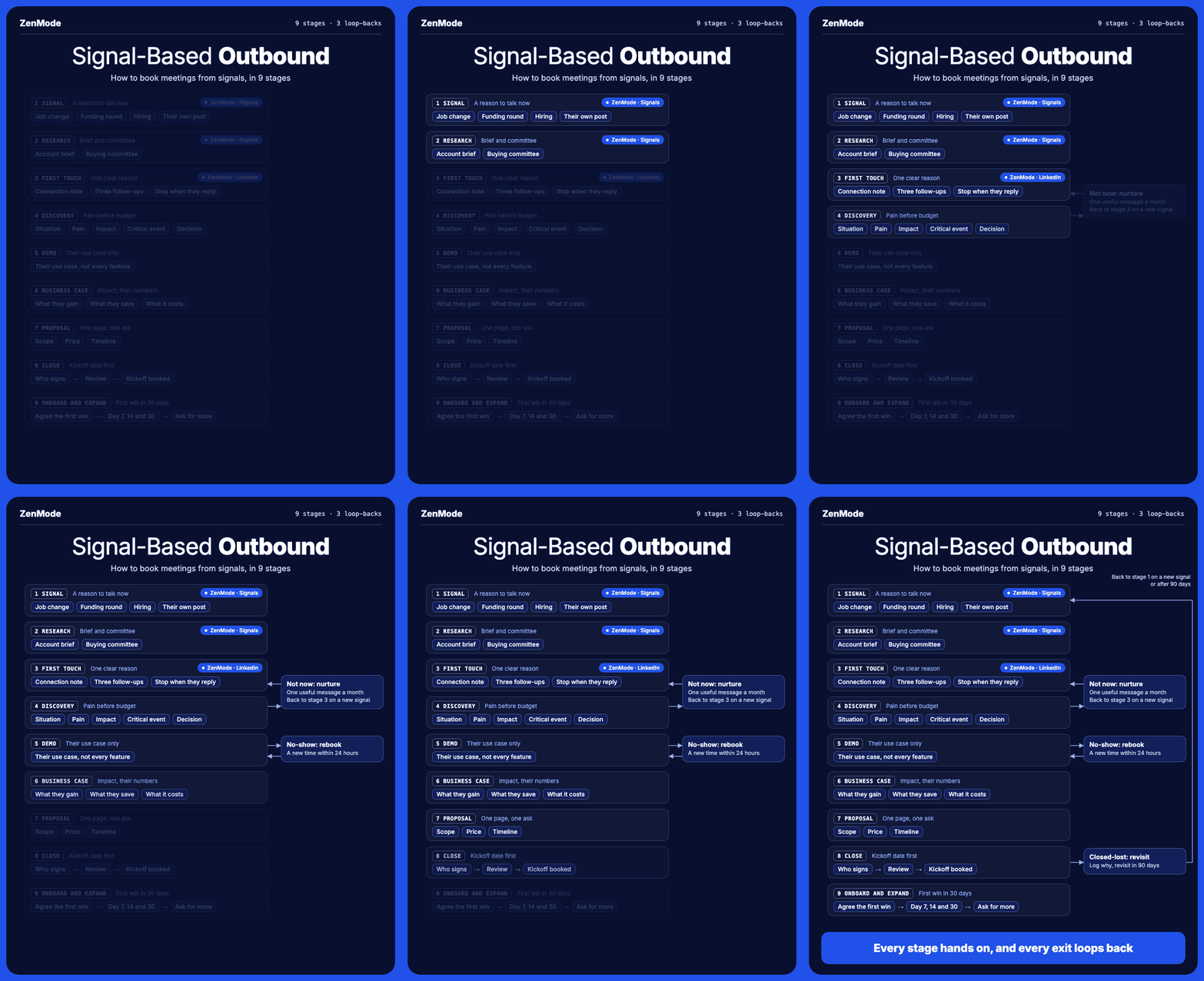
Signal-Based Outbound: 9 stages, with ZenMode running stages 1 to 3, and three exits that loop back
Each stage hands the prospect to the next. The three exits on the right never end the relationship: each one loops back to an earlier stage.

Most outbound fails on timing, not copy. A message to someone who just started a role, raised money or posted a job for the problem you solve has a reason to exist. The same message sent to a static list does not.

This playbook takes one prospect from that change to a signed, expanding customer in 9 stages. Each stage has a job, a template where one helps, an owner, and the mistake that usually breaks it. Stages 1 to 3 get the most detail, because that is where most teams lose deals they never knew they had.

Copy the templates, swap in your own offer, and work through the setup checklist at the end in your first week.

The 9 stages

Stage 1: Signal

Act on a change, not a profile. A signal is something that happened recently and gives you a reason to talk now.

SignalWhy it mattersAct withinWhere to find it
Job changeNew leaders review their tools and vendors earlyThe first 90 days in the roleSales Navigator's "Changed jobs" filter; new-role posts in your feed
Funding roundBudget has just landed and plans are being made30 to 60 days after the announcementCrunchbase, press releases, the company's LinkedIn page
Hiring for a related roleShows what they are investing in right nowWhile the job is openLinkedIn Jobs, the company's careers page
Their own post on your topicThey are thinking about the problem and they read LinkedInAbout a weekLinkedIn post search for your topic
Visits to your websiteThey are already looking at youA few daysA visitor tool that identifies the company (check your local privacy rules first)

Three rules:

  • Fit first. A signal from someone outside your ideal customer is noise. Filter by title, company size and industry before you look at signals.
  • Stack signals when you can. A new VP of Sales at a company hiring three SDRs beats either signal alone.
  • Keep the date. A signal past its window is just a fact. Record when it happened, not when you found it.

Stage 2: Research

Spend ten minutes per account before anyone writes a word. You need one true, specific reason to talk, not a biography.

The account brief, in five lines:

  1. What they sell, and to whom.
  2. The signal, and the date it happened.
  3. One specific thing from their website or recent news.
  4. The problem you most likely solve for them.
  5. Why now, in one sentence.

The buying committee. Open the company's LinkedIn People tab and search by title. Name these four:

RoleWho they areWhat they need from you
ChampionFeels the problem every week and will push for a fixA reason to act and material to forward
Economic buyerSigns off the budgetThe cost, the return and the risk
UsersThe people who will use it dailyProof it saves them time
BlockersIT, security, procurement, legalAnswers before they ask

Start with the champion, not the most senior person. A champion who brings you in beats a cold message to the CEO.

The usual mistake: researching for an hour and sending nothing. If you cannot find a specific fact in ten minutes, the signal alone is enough reason to connect.

Stage 3: First touch (LinkedIn)

The connection note has one job: give them one clear reason to accept. No pitch, no link, no ask.

Connection notes. Keep them under 200 characters, which is the limit on free LinkedIn accounts. React to the signal the way a person would.

Job change:
"Hi Sam, congrats on the new role at Acme. Building a sales team in your first few months is a big job. Would be good to connect."
Hiring:
"Hi Priya, saw Acme is hiring three SDRs. Always interesting to see how teams ramp new reps. Happy to connect."
Funding:
"Hi Tom, congrats on the Series A. Big moment for the team. Would be good to connect."
Their own post:
"Hi Leah, your post on reply rates was spot on about first lines. Would be good to connect."

Follow-ups after they accept. Each one ends with exactly one question.

  1. 1. Two to three days later, about them. No product yet.
    "Thanks for connecting, Sam. How are you approaching pipeline in your first quarter: building from scratch, or inheriting a process?"
  2. 2. About four days after that, what you do. One plain sentence, then a different question or a useful offer.
    "We help sales teams book meetings from moments like a new hire or a funding round. Would a one-page breakdown of how teams set this up be useful?"
  3. 3. About a week after that, the ask. Make it easy to say no.
    "If pipeline is a priority this quarter, happy to show you how it works in 15 minutes. If not, no worries at all."

Stop the sequence the moment they reply, and answer by hand.

Pace it like a person. Set a daily limit, send in business hours, and space the follow-ups out. A burst of 100 invites in an hour looks nothing like a human.

The usual mistakes:

  • Pitching in the connection note.
  • Saying how you found them ("I saw you liked a post by..."). Only mention what they did publicly themselves: their own post, their new role, their company's hiring or funding.
  • Following up with "just bumping this". Every message should add something new.

Stage 4: Discovery (SPICED)

Pain first, budget later. SPICED, from the sales consultancy Winning by Design, gives the call a shape so you leave with what you need for the next four stages.

LetterWhat you learnAsk
SituationHow they work today"Walk me through how you find new customers today."
PainWhat is not working"What happens when that doesn't work?"
ImpactWhat it costs them, in their numbers"How many meetings a month does that cost you? What is one worth?"
Critical eventThe date that makes it urgent"Is there a date this needs to be fixed by?"
DecisionWho decides, and how"Who else would want a say, and how do you usually buy tools like this?"

Write the answers into your CRM in their words, the same day. Stages 6 and 7 are built from these notes.

The usual mistake: demoing on the discovery call. If you show the product before you know the pain, you will show the wrong parts.

Stage 5: Demo

Show their use case, not every feature. A tailored 20-minute demo beats a complete 60-minute tour.

  1. Open with their pain, in their words, from your discovery notes. Ask: "Did I get that right?"
  2. Show two or three workflows that fix that pain. Use their market, their job titles and their kind of customer as the example wherever you can.
  3. Stop and check after each one: "Would your team use it like this?"
  4. End with a dated next step, such as a business-case review with the economic buyer on a set day.

The usual mistake: showing a feature because you are proud of it. If it does not touch their pain, leave it out.

Stage 6: Business case

Put the impact in their numbers and give your champion something to forward. Your champion has to sell this internally when you are not in the room.

The simplest version uses only figures they gave you in discovery:

  • What they gain: extra meetings a month × their close rate × their average deal value.
  • What they save: hours a week spent on manual outreach × the cost of those hours.
  • What it costs: your price, plus the time to set it up.

Turn that into three slides the champion can forward unchanged:

  1. The problem, in their own words.
  2. The impact, in their numbers.
  3. The plan: what happens, by when, and what it costs.

The usual mistake: using your own benchmarks. Their numbers are believable to their boss; yours are a sales pitch.

Stage 7: Proposal

One page, one decision. A long proposal gives a committee more to argue about.

  • Scope: what you will do, in their words from discovery.
  • Price: one number, or at most two options. Never three.
  • Timeline: the start date and the date of their first win.
  • What you need from them: people, access, approvals.
  • The decision: "Sign by [date] to start on [date]."

The usual mistake: sending it by email and waiting. Walk them through it on a call, then send it.

Stage 8: Close

Set the kickoff date before they sign. A deal with a start date in the diary closes; a deal without one drifts.

Agree a short plan with your champion, with an owner and a date for each step:

  • Who signs, and when.
  • Any security, legal or procurement review, and who starts it.
  • The kickoff meeting, already booked.

After every call, send the action items and next steps in writing the same day.

The usual mistake: assuming "yes" means signed. Until the contract is back, keep working the plan.

Stage 9: Onboard and expand

Land the first win inside 30 days, then ask for the expansion. A customer who sees a result early stays, and tells people.

  • At kickoff: agree what the first win is, in their numbers (for example, the first five booked meetings).
  • Day 7, 14 and 30: a short check-in against that win.
  • When the win lands: share it with the economic buyer, then ask for more seats, another team, a referral or a case study.

The usual mistake: asking for expansion before the first win. Earn the second yes.

Nothing dies in the CRM

Every exit loops back. A "no" today is usually a "not yet", and the next signal tells you when.

ExitWhat happensWhen
Not nowMove to nurture: one useful, non-salesy message a month. A new signal sends them back to stage 3.Monthly, until a new signal
No-showRebook with a short, friendly note: "Looks like today got away from you. Here are two other times this week."Within 24 hours
Closed-lostLog the reason in their words, then revisit. A new signal before then sends them back to stage 1.90 days

Give every loop an owner and a CRM task with a date. A loop without a date is how deals quietly die.

A tool and an owner at every stage

In a small team one person can own several stages. What matters is that each stage has a name next to it.

StageToolOwner
1. SignalSales Navigator, Crunchbase, LinkedIn Jobs, or a signal toolSDR or founder
2. ResearchThe company's site and LinkedIn page, an AI assistant for the briefSDR or founder
3. First touchA LinkedIn outreach tool such as ZenModeSDR or founder
4. DiscoveryVideo call, call recorder, CRMAccount executive
5. DemoVideo call, a demo account set up for their use caseAccount executive
6. Business caseSpreadsheet and slidesAccount executive, with the champion
7. ProposalA one-page document and e-signatureAccount executive
8. CloseCRM and e-signatureAccount executive
9. Onboard and expandCRM and an onboarding checklistCustomer success
Loop-backsCRM tasks with datesWhoever owned the exit

Set it up this week

You can run all of this by hand. Here is the first week:

  • Day 1: write your ideal customer in one line: title, company size, industry, location.
  • Day 1: pick two signals from stage 1 that fit what you sell.
  • Day 2: find 50 people who match your ideal customer and show one of those signals.
  • Day 2: write a five-line brief for your top 10 accounts.
  • Day 3: write one connection note per signal, plus the three follow-ups.
  • Days 3 to 5: send at a human pace: a daily limit, business hours, follow-ups spaced days apart.
  • Day 5: set up the three loop-backs in your CRM, with an owner and a date each.
  • Every Friday: count accepted, replied and booked by signal. Keep the signals that book meetings; drop the rest.

How ZenMode runs stages 1 to 3

ZenMode runs the LinkedIn part for you. It finds people by title, location and industry. It writes each person's connection note and follow-ups with AI. It sends them from your own LinkedIn account through the ZenMode desktop app, within your daily limits and business hours. Follow-ups stop when someone replies, and replies land in one inbox that can sync to HubSpot, Salesforce or Monday.com.

How Signals works in ZenMode

Signals runs stages 1 and 2 for you and hands the leads straight to stage 3. Signals is rolling out to ZenMode plans now.

  1. Tell it what you sell. Enter your website. ZenMode suggests your ideal customer (job titles, company size, industry and location), and you approve or change it.
  2. It finds people with a signal. ZenMode looks for the signals in the table below and keeps only the people who match your ideal customer.
  3. It researches each lead. It reads the lead's company website and picks out one specific fact worth mentioning, the account brief from stage 2.
  4. It writes the messages. AI writes each lead's connection note and follow-ups from that fact, under the stage 3 rules: no pitch in the note, one question per follow-up.
  5. The leads go straight into your campaign. No lists to export or upload. Leads that have both a signal and a researched fact are sent first, because they are the strongest.
  6. You can see every lead on the Signals tab: who they are, their company, what their signal was, when it happened and how strong it is.
SignalWhat it tells youHow the message uses it
Engaged with a post about your topicThey are paying attention to the problem you solveSets the topic of the message. It never says how you found them
Engaged with a competitor's posts, page or leadersThey are looking at options like yoursSets the topic. The competitor is never named
Engaged with your own postsThey already know who you areSets the topic, as a warm lead
Wrote their own post on your topicThey are thinking about it right nowThe message can mention their post
Their company is hiring for a related roleThey are investing in this area nowThe message can mention the hiring

The rule behind that last column is the same one from stage 3: a message only mentions what the lead did publicly themselves. Everything else decides what to talk about, never what you say you saw.

Start a 14-day free trial at zen-mode.io.

Jonathan Lis, Founder, ZenMode
Go deeper